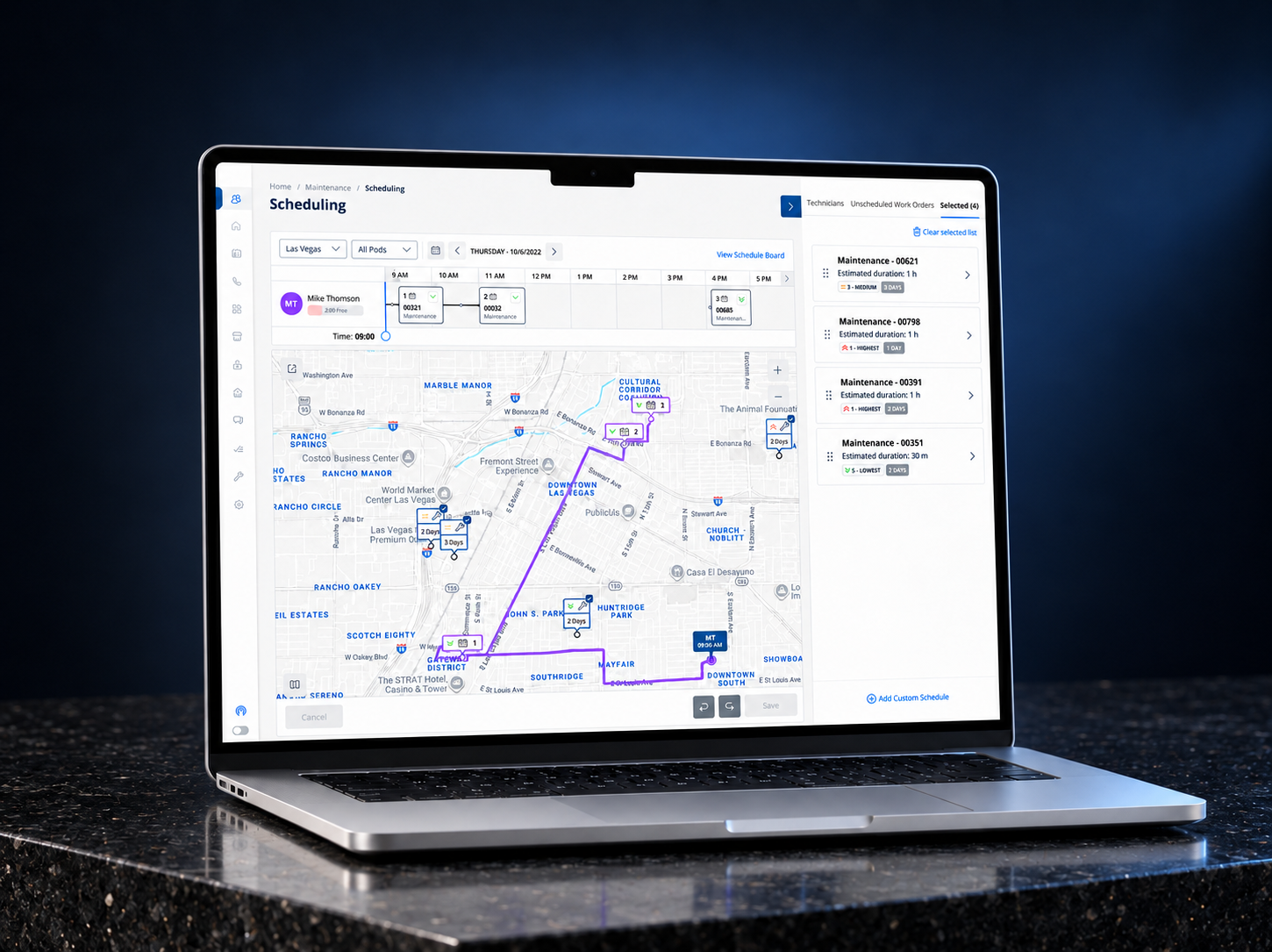
AMH’s Scheduling application helps Field Managers assign property maintenance work orders to technicians and plan their day across multiple properties.
Field Managers
Decide who takes each job and when, balancing workload, travel, urgency and appointment constraints.
Technicians
Travel between properties and carry out the assigned inspections and maintenance work.
The scheduling interface could show free time. The harder problem was helping Field Managers judge whether a technician, work order and point in the day actually made operational sense together.
RoleProduct Designer — workflow definition, research synthesis and interaction design
OutcomeRoute-aware dispatch workspace with clearer context before commitment
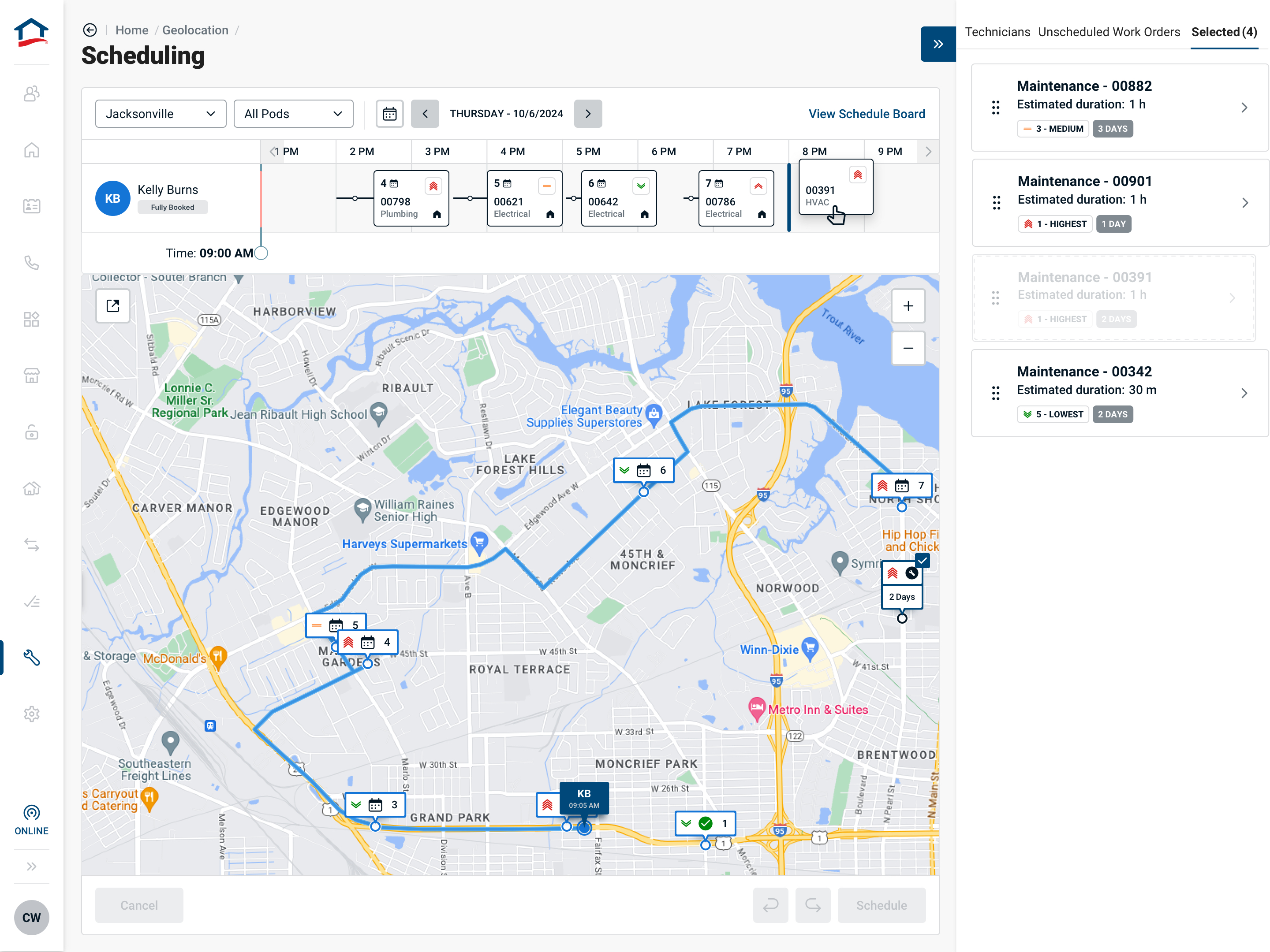
The redesigned scheduling workspace — route, timeline, capacity and selected work in one decision space.
01 · The problem
The brief was scheduling. The problem was decision quality.
Placing work into an empty calendar slot was not the difficult part. A technician could have capacity and still be the wrong choice because of route, workload, priority, service constraints or the shape of the rest of their day.
Working without initial user access. I partnered closely with an operational subject-matter expert to map the existing workflow, surface edge cases and challenge early assumptions. I treated that input as informed, directional evidence—not as a substitute for user research.
The decision to make
Is this technician actually a sensible person to assign this work to, at this point in their day?
Legacy versus redesign
From reading the board to judging the assignment.
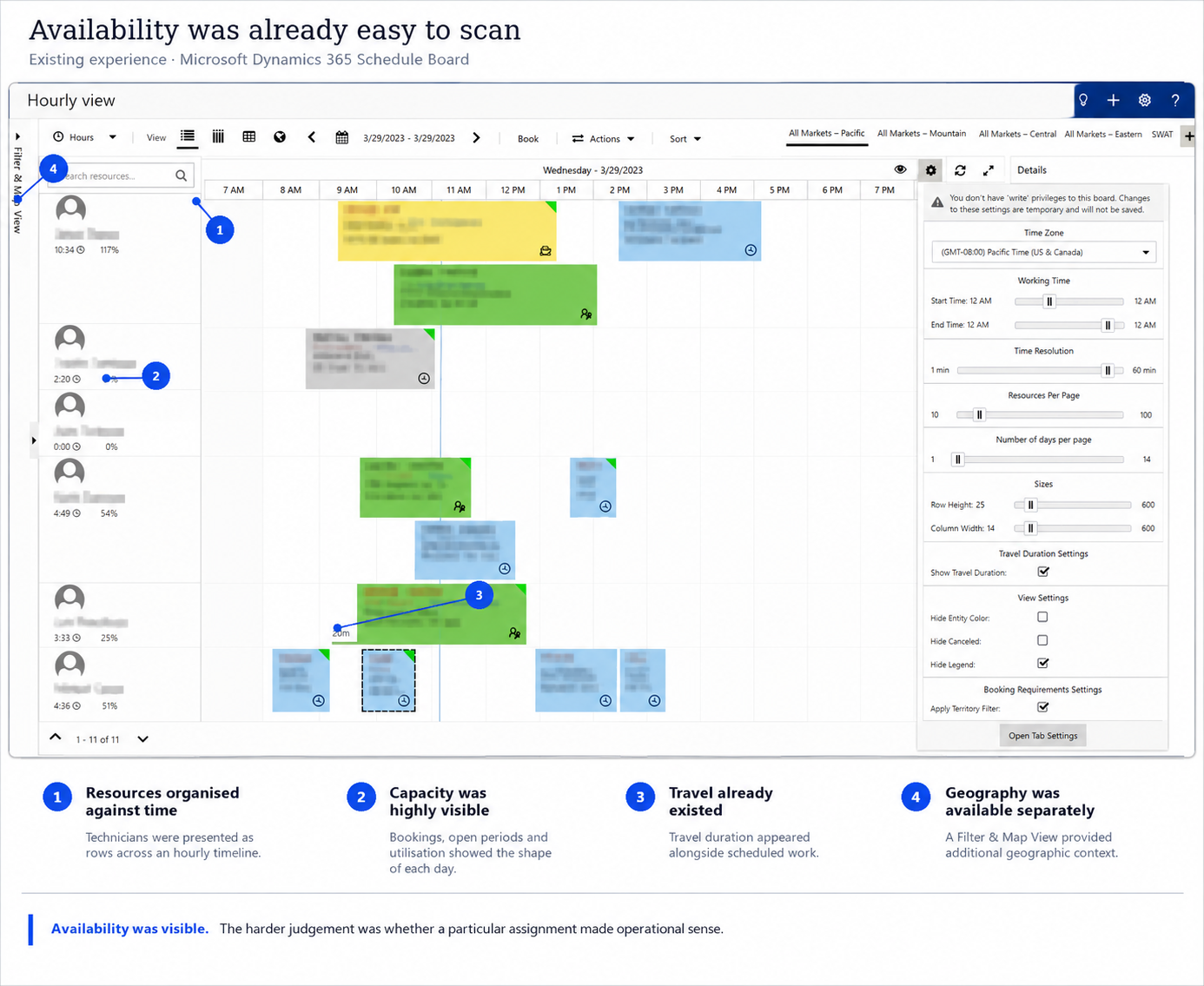
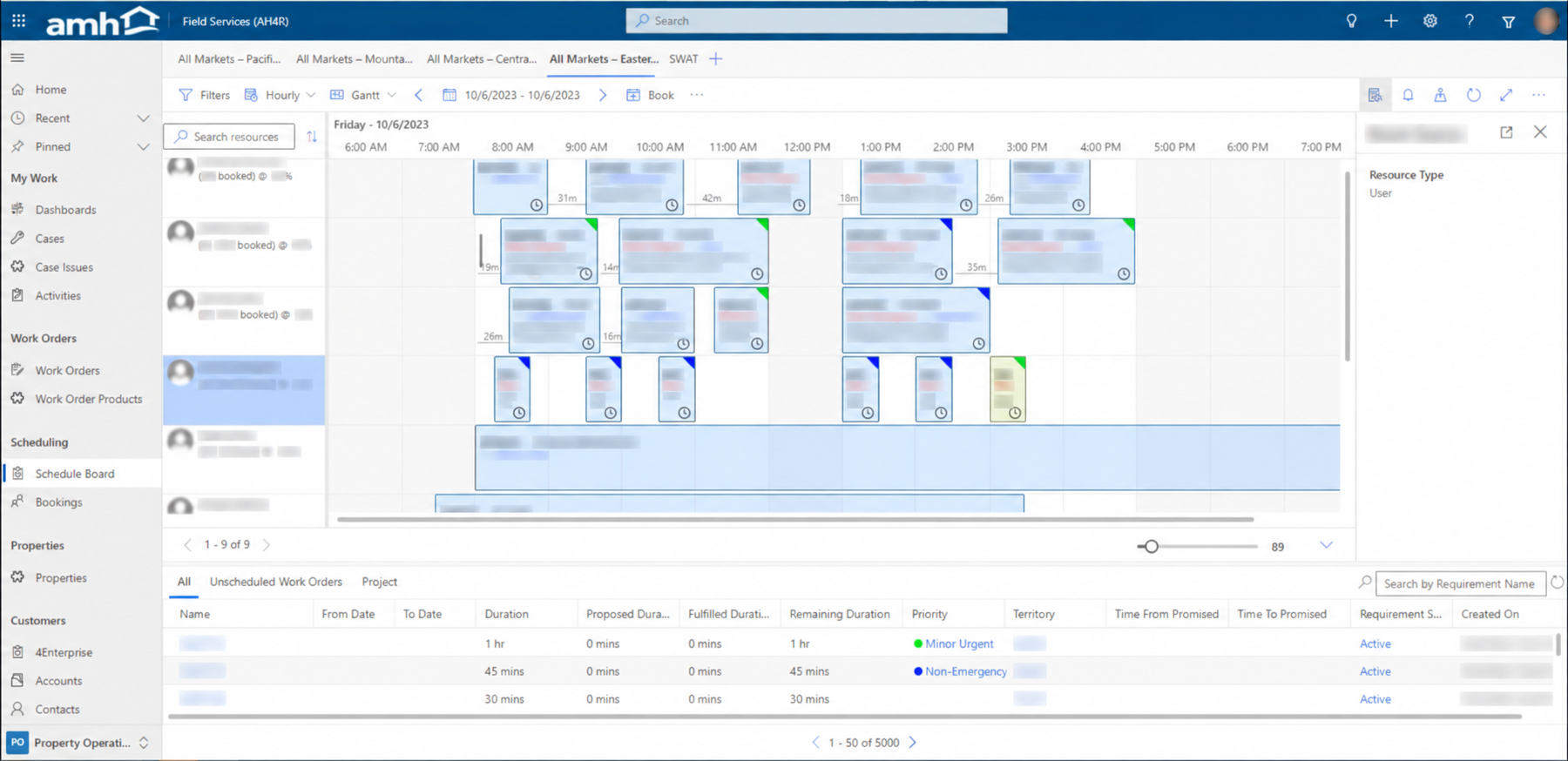
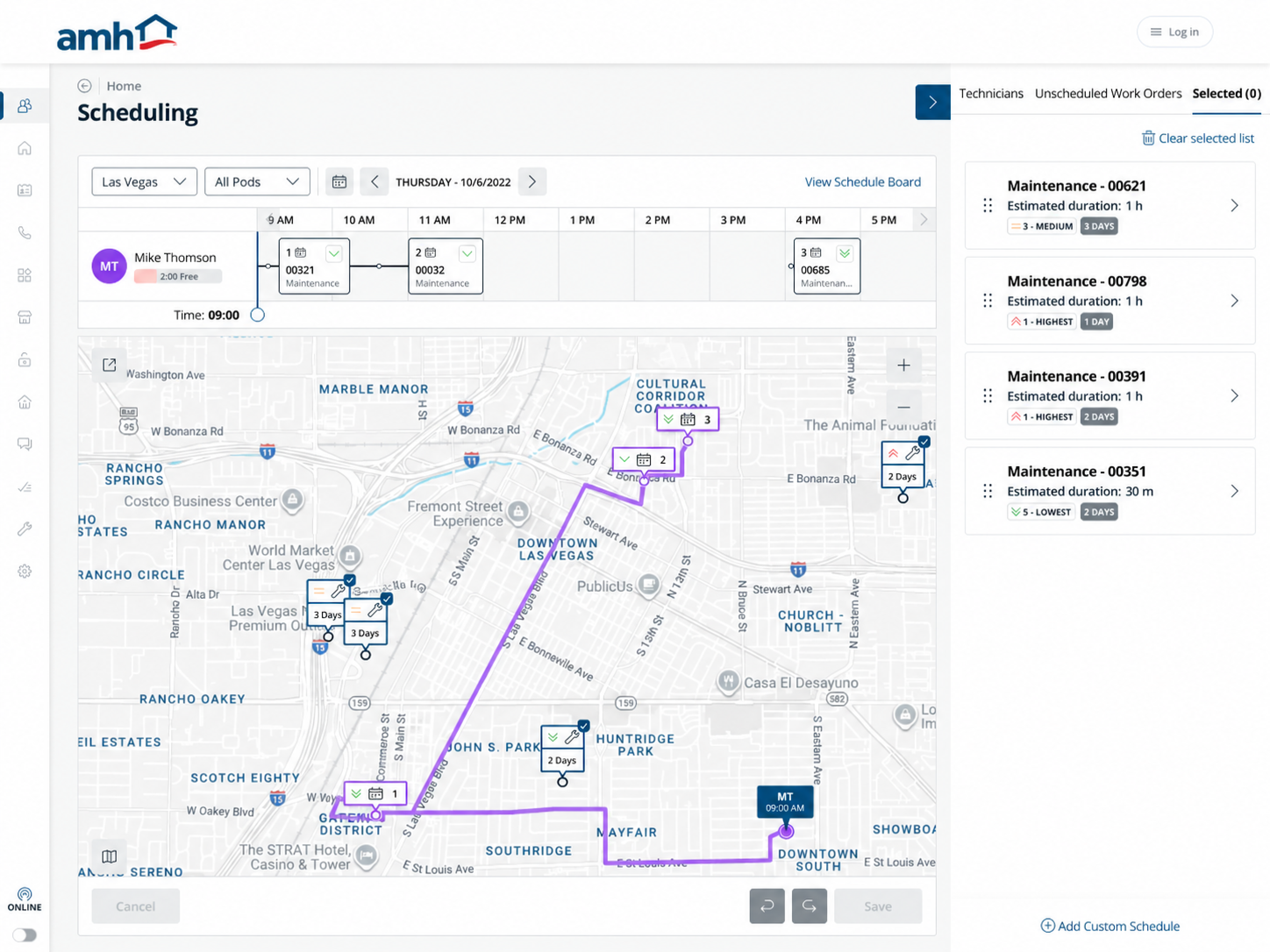
The legacy board already showed bookings, utilisation, travel intervals and priority. The redesign brought the selected technician’s day, route and candidate work into one view to support the decision: does this job fit here?
Legacy · Schedule board
Scan the team’s bookings.
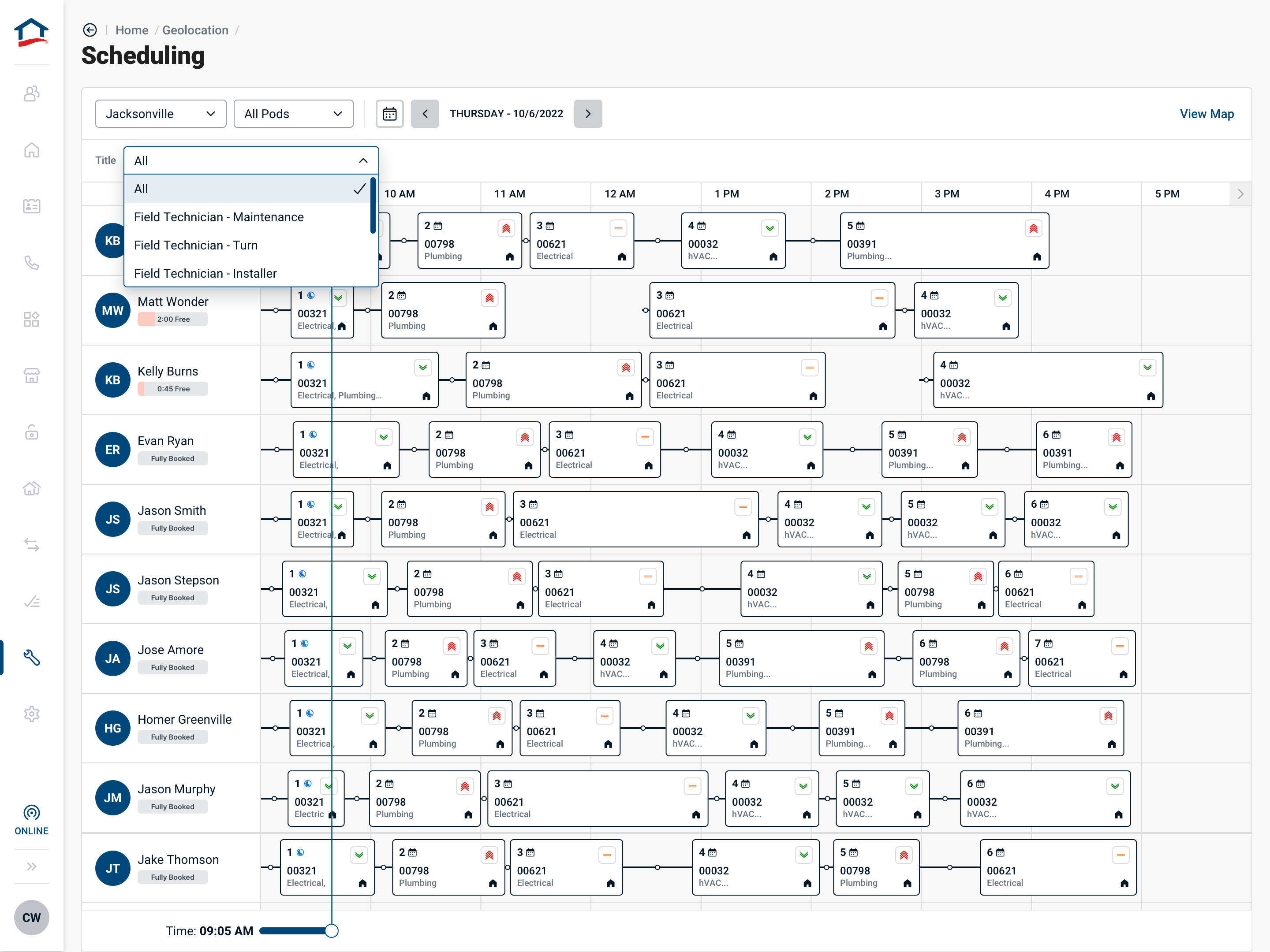
Technician rows and a time grid above an unscheduled-work table.
These screens show different data and levels of focus: a legacy team board and a redesigned selected-technician view. The redesign also retained a team schedule board.
01Connect the time slot to the journey.
Legacy
Bookings show addresses and travel intervals within the time grid. This board view does not show their positions on a map.
Redesign
Numbered appointments on the timeline correspond to stops on the route below, keeping sequence and geography together.
Why it matters: A free slot can be assessed alongside the journey it would require.
02Separate the backlog from the shortlist.
Legacy
Unscheduled work sits in a table below the team schedule, with duration, priority and other fields spread across columns.
Redesign
Unscheduled Work Orders provides filters; Selected holds candidate jobs beside the map and the technician’s day.
Why it matters: The manager can narrow the queue, then judge a smaller set of jobs in context. See the filtering decision ↗
03Keep key job information in view.
Legacy
The supplied detail view opens a long work-order panel over the schedule. It includes status, unit information and a lengthy work summary.
Redesign
Candidate cards keep duration, priority and age visible in the right rail. A separate review brings estimated travel, start and finish together before confirmation.
Why it matters: Key assignment information stays visible while the manager considers the plan. See the confirmation decision ↗
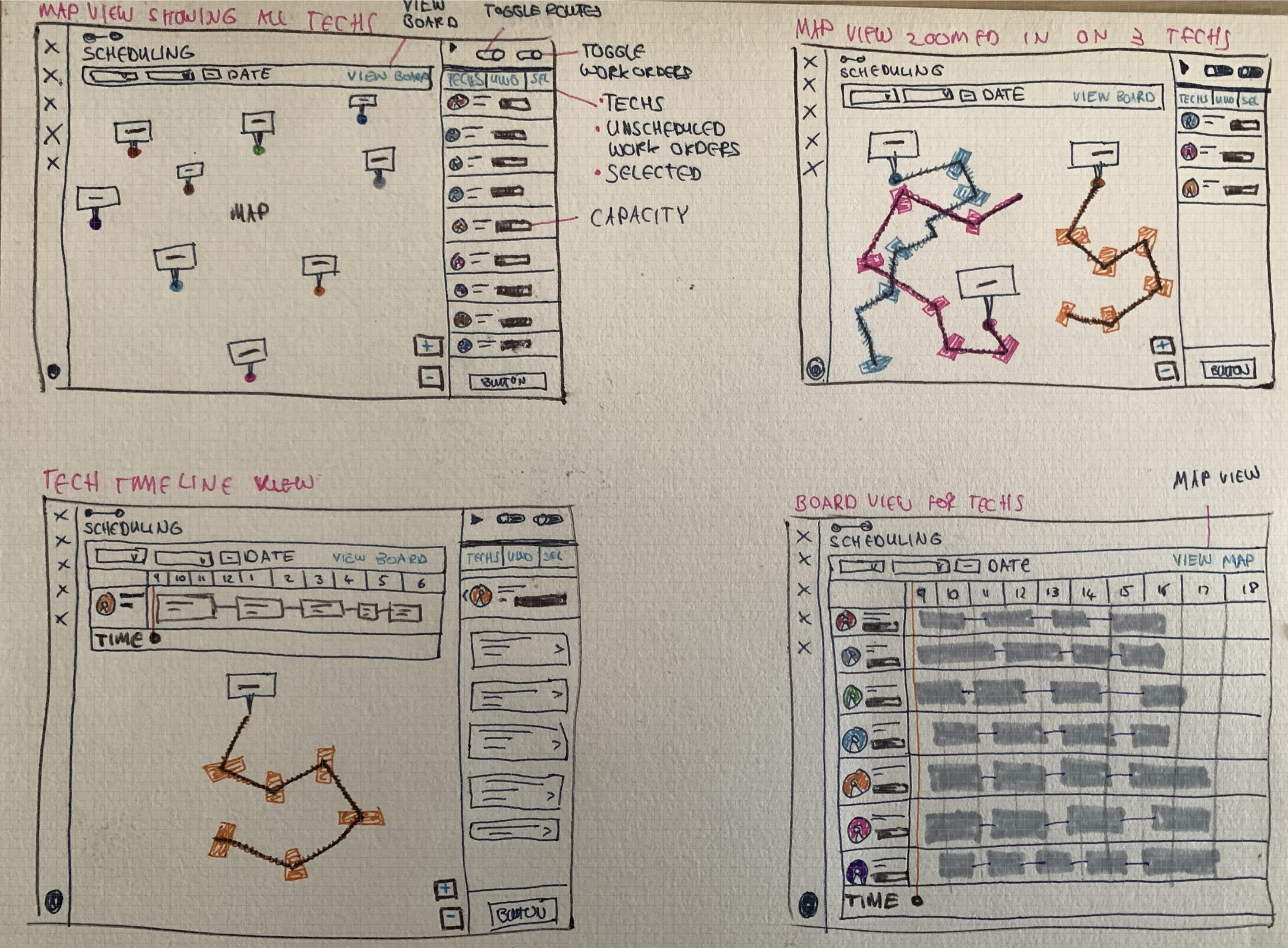
Early exploration
From separate views to one decision workspace.
Four rounds of paper sketches tested how map, schedule, technician capacity and work-order detail could work together. The sequence shows the design moving from loosely connected controls toward the shared map-and-timeline workspace used in the final direction.
Iteration 04 — Converging on a shared workspaceThe final paper pass combined the strongest ideas: map and board views, technician timelines, workload panels and routes for selected technicians.
04 / 04
02 · The decision model
Empty slots weren’t enough.
I synthesised the main factors affecting assignment fit into four signals. This became a working model for both the product and the story of the redesign.
01 · Capacity
Is there usable time?Workload and non-work commitments.
02 · Location + route
Does the journey make sense?Technician location and travel impact.
03 · Priority
What should be acted on first?Urgency and ageing work.
04 · Service constraints
When can the work happen?Resident and appointment context.
Assignment fit = right technician + right work + right point in the day.
Decision 01
Put geography and time in the same decision space.
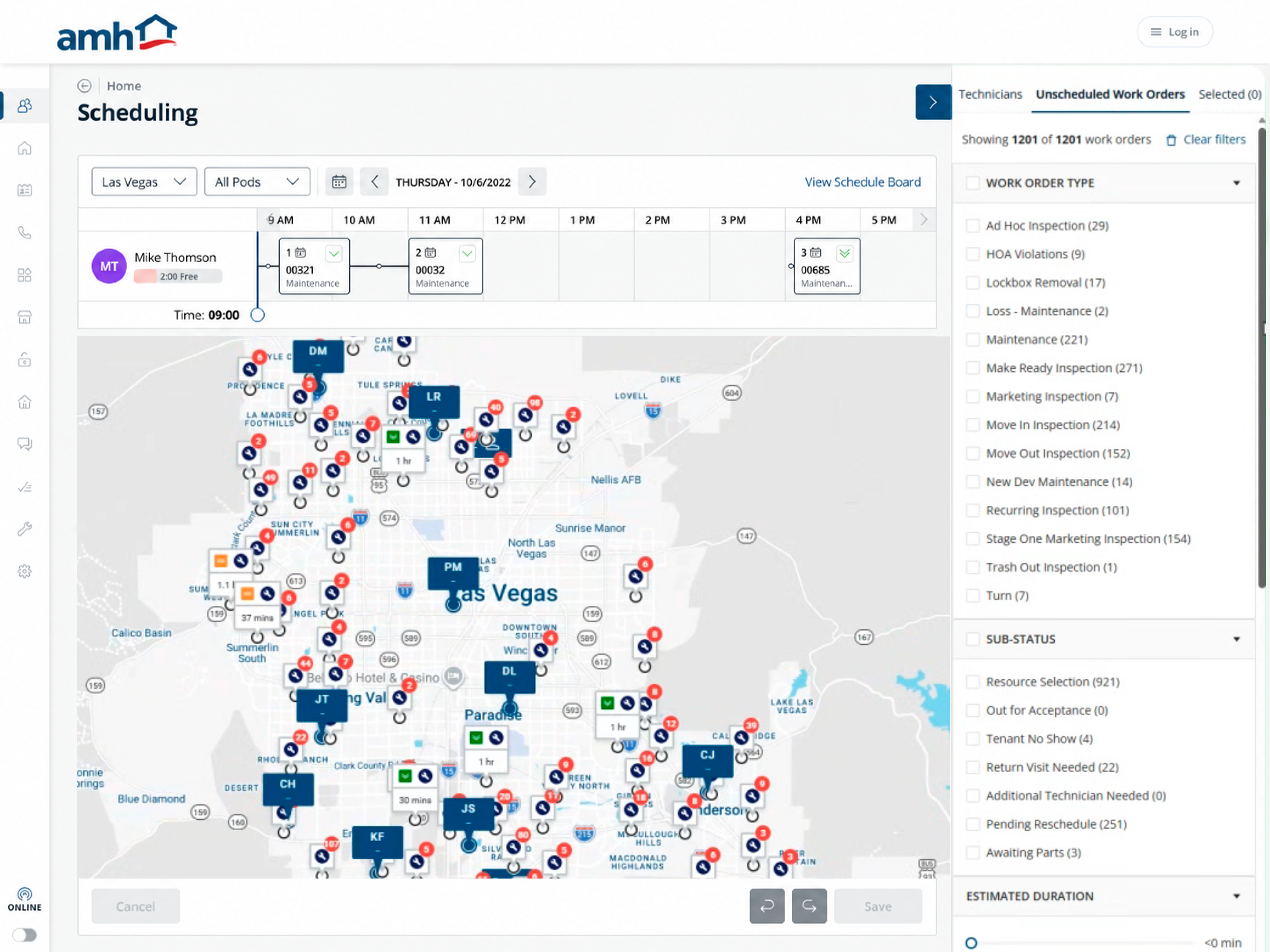
The timeline made workload and sequence visible while the map exposed the geographic consequence of the same assignment. Selecting a technician or work order changed both views of the problem together.
The legacy board already showed bookings, booked-time percentages and travel intervals. This view brings a selected technician’s schedule, mapped route and candidate work together, so time and geography can be judged in the same workspace.
12345
1
Capacity beside the person
The free-time indicator stays next to the selected technician. It gives a quick capacity cue before the manager checks how that time is distributed.
2
Sequence in the timeline
Booked work appears in order across the day. Its numbered stops also appear on the map, connecting each appointment to its location.
3
A gap is a candidate slot
Open space reveals possible scheduling slots. The manager can compare a gap with the job’s duration and route before deciding whether it is usable.
4
The route behind the schedule
The selected technician’s route is visible beneath the timeline. Nearby work and detours can be considered alongside the appointment sequence.
5
A shortlist with decision context
Selected work stays in the right rail with estimated duration, priority and age. The manager can judge candidate jobs without losing sight of the route or day.
Engineering constraintLocation pins for everyone; calculated route for the selected technician.
This reduced routing-API usage and map clutter without removing the context needed to choose a candidate.
Decision 02
Narrow the work before judging the fit.
In a market like Las Vegas, the unscheduled queue could contain more than a thousand work orders. The workflow therefore separated two decisions: first reduce the candidate work, then assess whether it fitted a technician’s day.
The legacy screen placed the unscheduled queue in a table beneath the schedule. Here, filters sit beside the map while the selected technician’s timeline remains visible.
123
Reading the redesign · Narrow the queue, then assess the fit.
1
Separate the three tasks
Technicians, Unscheduled Work Orders and Selected give the manager distinct views for finding a person, finding work and reviewing a shortlist.
2
Filter by operational needs
Work type, sub-status, estimated duration and priority narrow the candidate queue. These controls make the criteria for choosing work explicit.
3
Keep location in the decision
The map places work geographically while the technician’s day stays above it. The manager can consider where a job is as well as what needs doing.
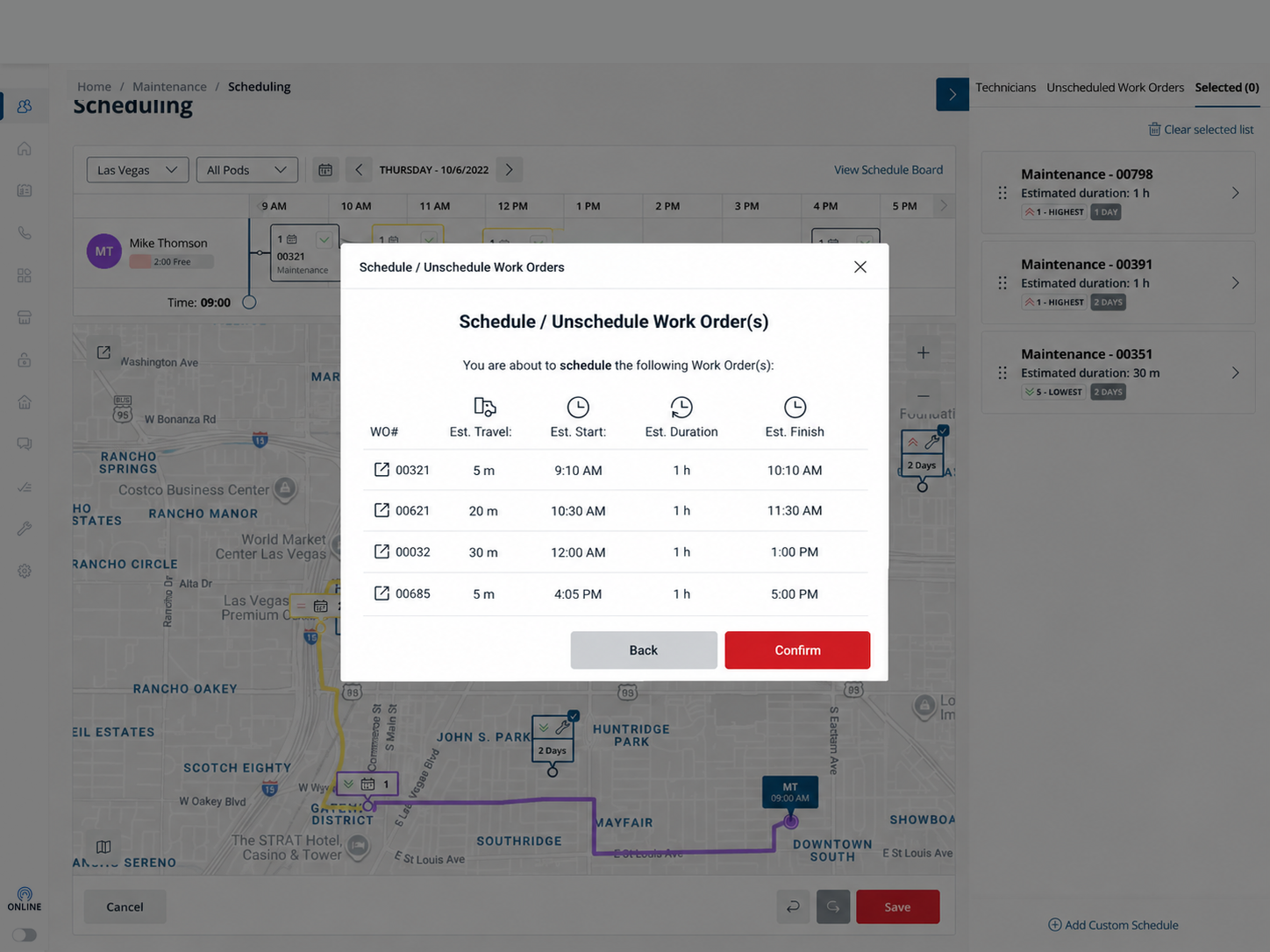
Field Managers could explore, filter, select and position work quickly. Before saving the assignment, a review step brought the work orders and their estimated travel, start, duration and finish together.
12
Reading the redesign · A deliberate checkpoint before assignment.
1
Review the timing consequences
Each work order has its estimated travel, start, duration and finish in one row. The manager can inspect the proposed schedule before making it final.
2
Return or commit
Back allows another pass at the plan; Confirm makes the decision explicit. The extra step puts a checkpoint where an assignment becomes consequential.
An experienced Field Manager challenged the working model.
The SME collaboration helped me frame the first decision model and identify what still needed direct testing. Once the concept was coherent enough to challenge, I used a moderated session with an experienced Field Manager.
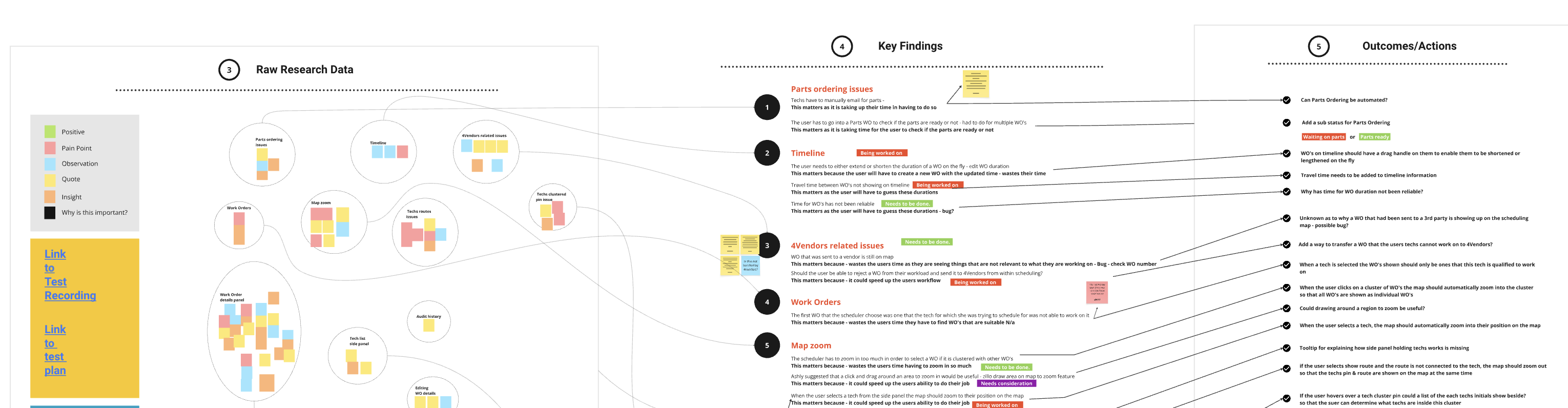
Raw research was synthesised into key findings and linked to the product actions they informed.
What held
The need to see route, workload and service context together before assignment.
What sharpened
Once a technician was selected, the participant wanted the remaining technicians removed from view — reinforcing a simpler selected-route model.
05 · Outcome
51%
Reduction in time to service complete.
Reported by the AMH stream PM. I don’t have the baseline, timeframe or measurement method, so this is a reported operational result—not a measured effect attributable to my design alone.
The product direction shifted scheduling from a calendar-first task into route-aware dispatch decision support, giving Field Managers clearer context before consequential work was committed to the field.
Product outcome
Calendar-first scheduling became a route-aware dispatch workspace.
User / team outcome
Capacity, route, priority and service context were visible before assignment.
Operational outcome
The workflow created a more repeatable model for high-consequence scheduling decisions across markets.
Other areas of the platform
One decision model, several operational views.
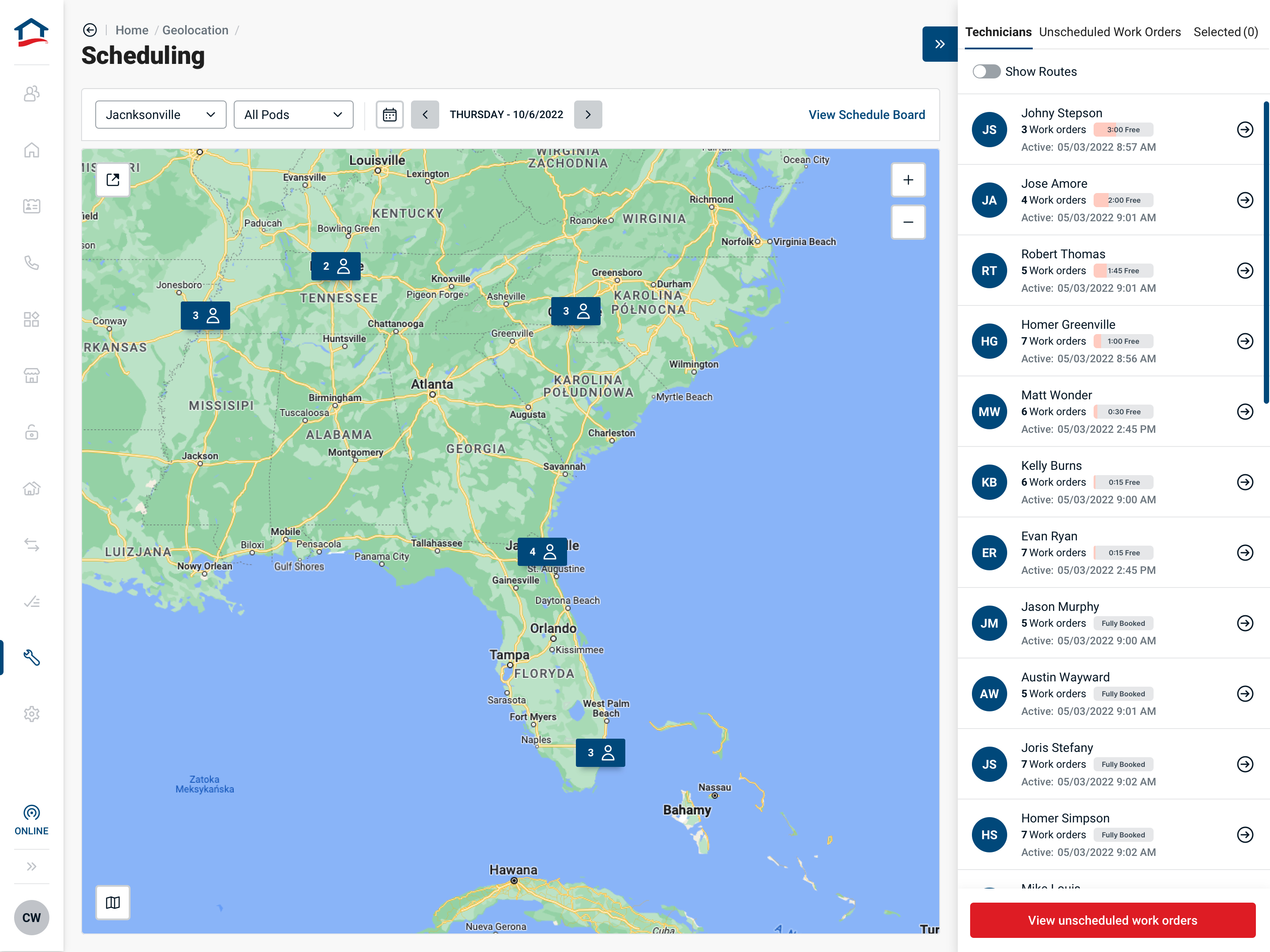
The core scheduling flow sat within a broader operating view. Field Managers could move between market coverage, team workload and the route of a selected technician without losing the context behind the decision.
See the operation at market level.
Regional clustering connected technician coverage with workload, helping Field Managers understand where capacity existed before narrowing to an individual schedule.
The selected-work view brought the candidate queue, technician timeline and calculated route together so the impact of each placement remained visible.