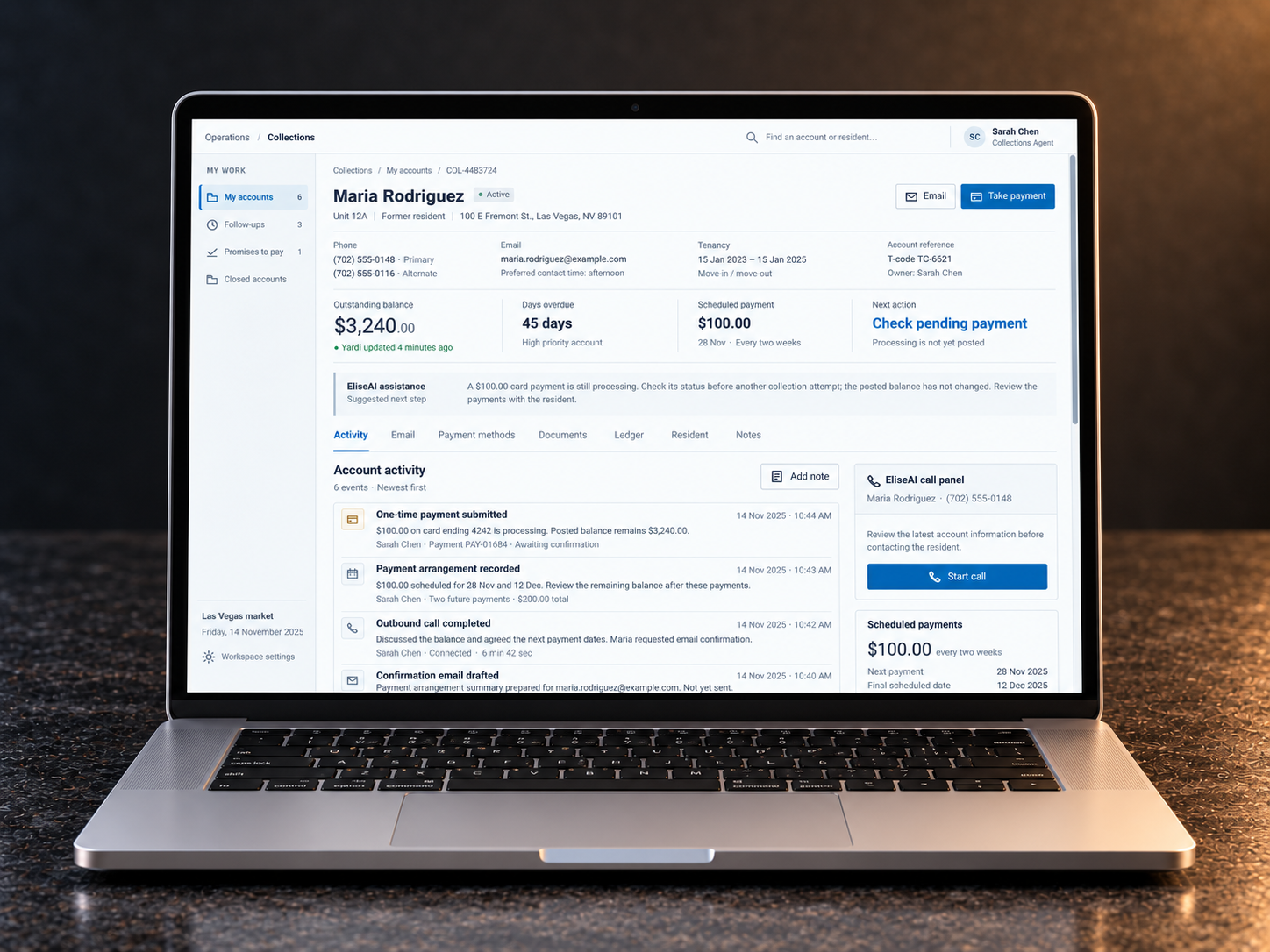
Collections agents help resolve unpaid balances after residents move out. Before contacting someone, they had to piece together the current balance, previous conversations and supporting documents. I designed a proposed workspace that brought this context together around the account.
The evidence came from a recorded interview led by the AMH Product Owner with a Collections Administrator.
The problem wasn’t switching systems. It was rebuilding the account.
CRM already held collection lists, tenant records and communication activity, with a tenant-ledger view also available. Agents still checked Yardi for current financial context, worked with replies in Outlook, and relied on Excel for intake and reporting. The opportunity was to organise that context around the next collections decision—not to introduce an account history where none existed.
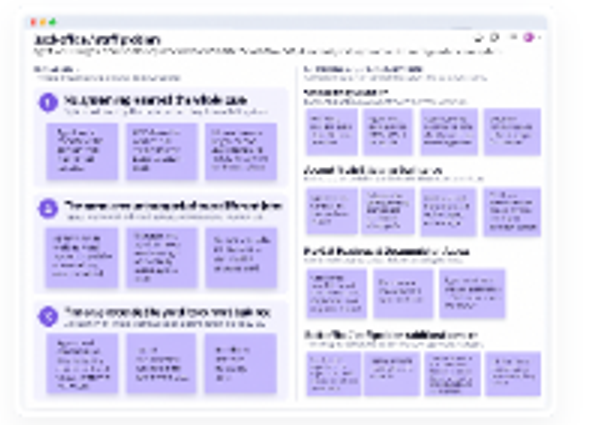
What we could seeAgents continually switched between systems.
What they were actually doingReconstructing a usable account before they could act.
The underlying design problemRelevant context existed, but agents had to reconcile it across views and systems.
The design opportunity was to bring the relevant context together around the next collections decision.
02 · What the evidence changed
Three findings that shaped the workspace.
The interview synthesis and journey maps showed where the work broke down. Each finding led to a specific design response and an intended operational benefit.
Stakeholder direction and my contribution
The Product Owner led the original interview, and the request to bring CRM and Yardi together was already established. I reviewed the recording, extracted observations and pain points, and grouped the recurring themes. My contribution was to turn that evidence into an account model, workflows for administrators and agents, and interaction designs.
01 · Finding
A worklist was not a reliable account picture.
Balances could change after allocation. Agents returned to Yardi for the current ledger, memos and documents before contact.
My design response
Bring the balance, its update time, ledger summary and supporting documents into the account.
The account became the stable foundation. The experience around it could then change according to the work being done.
Allocation · workload · oversight
Collections Administrator
Allocate and assign accounts, monitor progress across the caseload, and identify where agents need attention or support.
Understand · contact · progress
Collections Agent
Prepare for contact with a former resident, record communication and outcomes, and progress the account towards payment or follow-up.
Both roles work from the same account state, history and commitments. The administrator sees the team’s work; the agent sees the detail needed to progress one case.
From evidence to product decisions
Decision 01
See where attention is needed. Then follow the account.
Administrators needed to distribute work, monitor workload and spot accounts needing attention. Their workspace starts with the caseload, then narrows to an agent’s queue before opening an individual account.
Decide where to intervene.
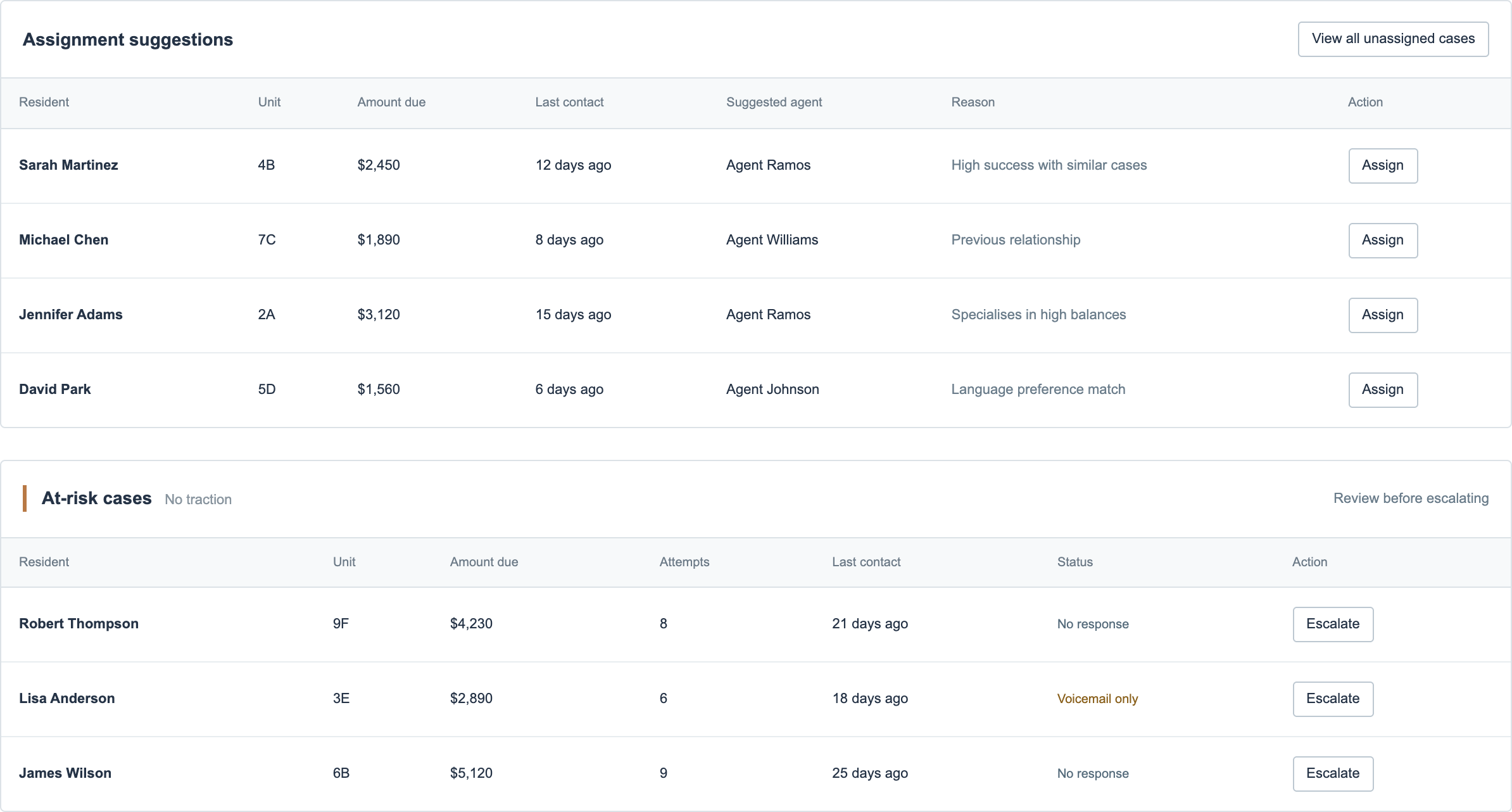
The proposed dashboard brings assignment suggestions and stalled cases together. An administrator can review who might take the work and which accounts need attention, without treating a recommendation as a decision already made.
12
A focused excerpt, refined from my original wireframe. Account data and assignment recommendations are illustrative, not validated outcomes.
1
Review the proposed owner.
Each suggestion pairs an agent with a reason. The administrator retains the assignment decision.
2
Spot work that has stalled.
Contact attempts, last contact and response status sit together, providing context before escalation.
From oversight to action
Review the person carrying the work.
The agent-level view brings workload, payment commitments and upcoming follow-ups together. Here, the administrator can review Sarah’s 47-case queue before opening a specific account.
The excerpt shows the workload summary and four example cases—not the full queue.
The administrator’s review of an agent’s queue. All records and workload figures are illustrative.
Optional detail: team overview, full case list, case details and analytics. Example metrics describe the concept, not project results.
The agent’s side: turning assigned work into a next action
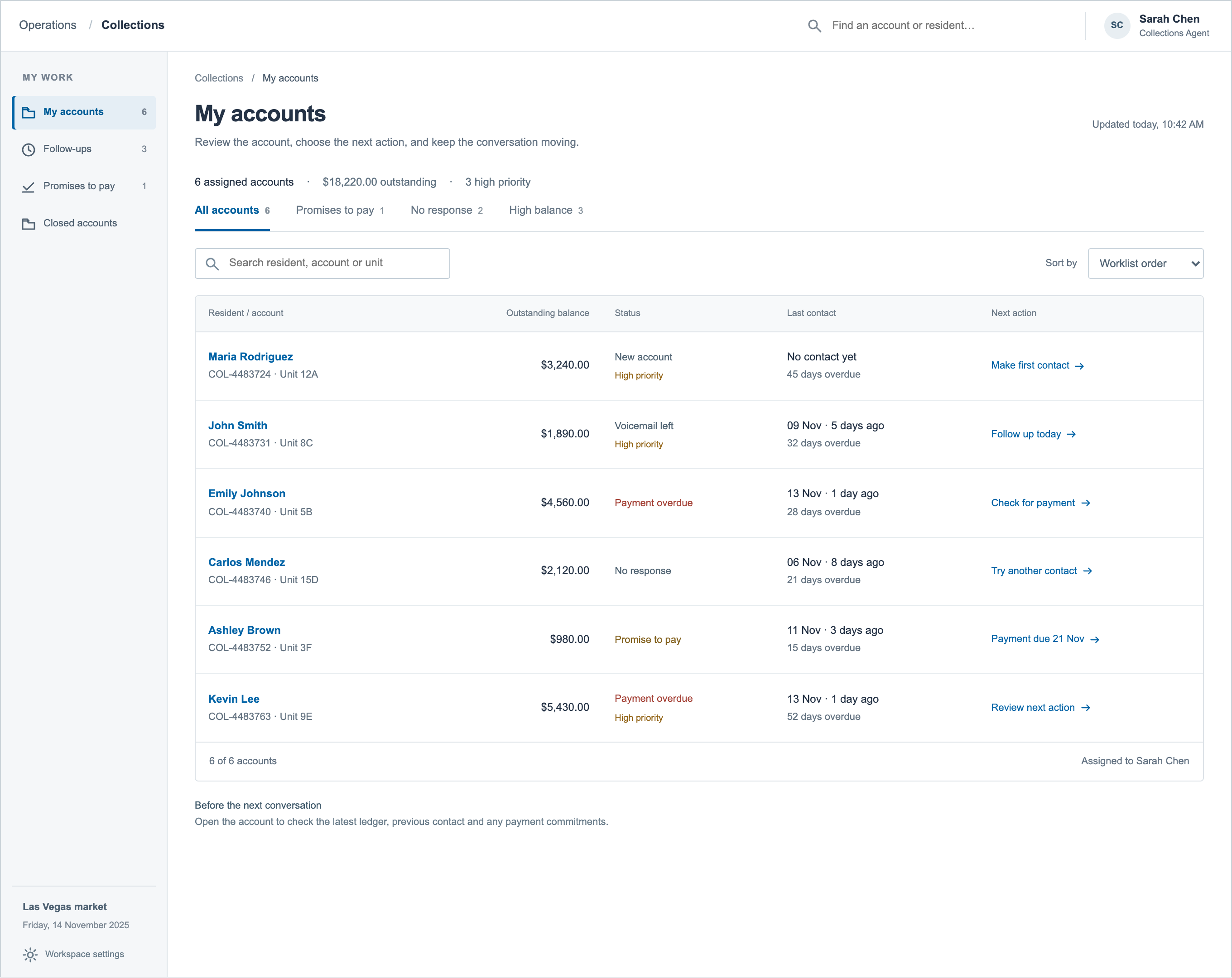
Administrators organise the workload; agents need to decide what to do next. Their worklist brings balance, contact history, status and next action into each row.
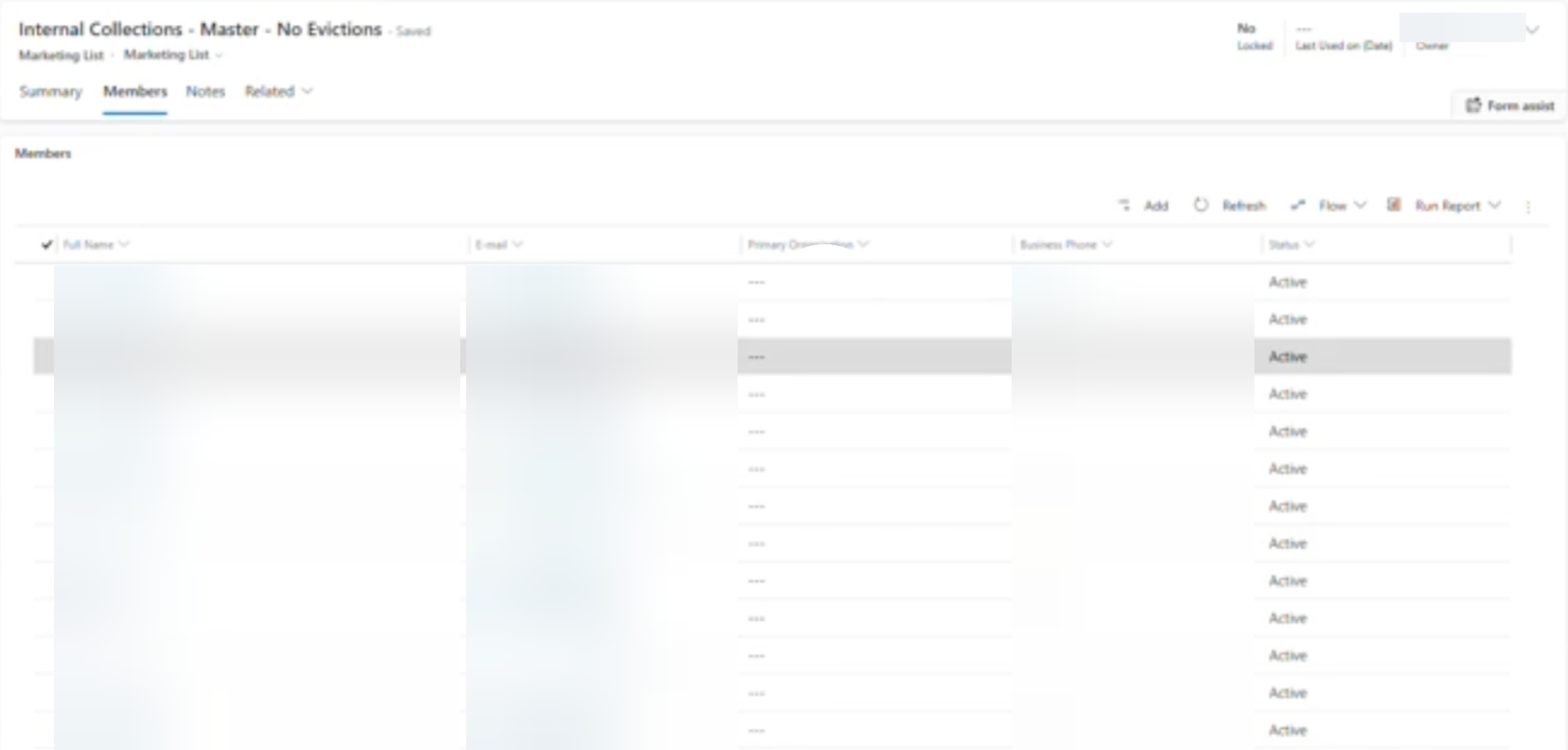
Legacy CRM · Internal Collections member list. Cropped from the original screenshot, with personal details blurred into the image and the recording’s play overlay removed. The interface has not been regenerated.
From contact list to worklist
Make the next action easier to identify.
The visible legacy list foregrounded names, email addresses, phone numbers and status. The proposed worklist below brings balance, last contact and next action into the scan, so agents can assess the work before opening an account.
This compares the information shown in these views, not every capability of the CRM. The proposed records are illustrative.
Refined from the original My Cases wireframe. The worklist connects each account to an action, rather than showing the balance alone.
Once an account is opened, the focus changes: from who owns the work to what the agent needs for the next conversation.
Decision 02
The information needed for the next call, in one account.
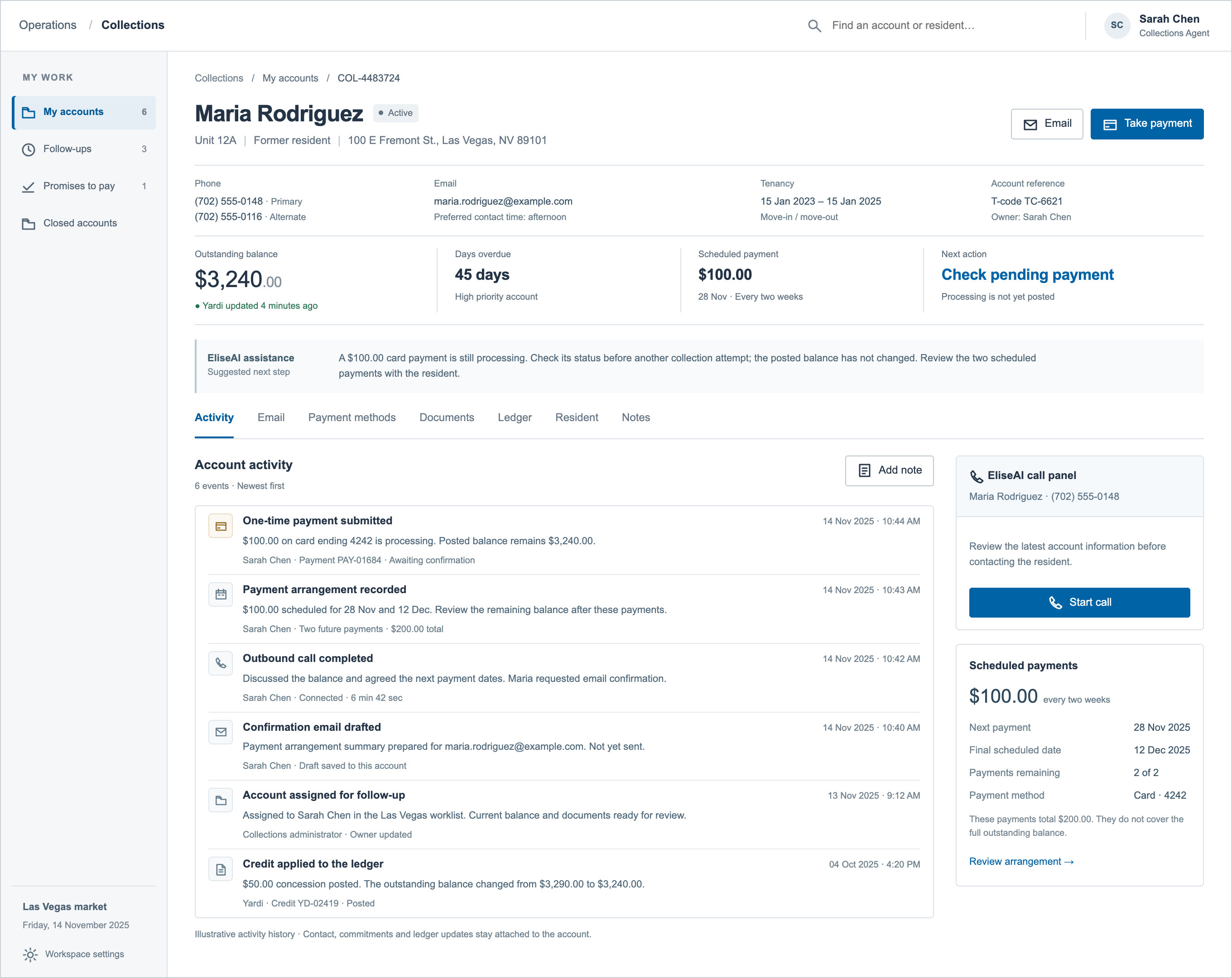
The single-account view brings together the balance, next action, activity history, payment arrangement and contact tools. An agent can understand the account and continue the conversation without rebuilding its context across separate systems.
12345
The Activity workspace shown in the hero, presented here in full with five annotations. Account data and activity are illustrative; the proposed integrations still require validation.
1
What is owed, and how current is it?
The balance carries a Yardi update time, addressing the need to re-check a potentially stale worklist. The cue makes freshness visible; reliable data still depends on the integration.
2
What was agreed, and what happens next?
The scheduled amount and next payment date sit beside an explicit next action. Here, the agent is prompted to check a pending payment before making another collection attempt; processing does not yet mean posted.
3
What has already happened?
Contact attempts, commitments, notes and ledger changes share an account timeline. The proposed view gives the next conversation a starting point without assembling its history from separate records.
4
How much does the arrangement cover?
The payment panel shows the amount, frequency, dates and remaining instalments. Two scheduled payments total $200—not the full $3,240 balance—so the agent can distinguish the arrangement from resolution of the account.
5
Can I act without losing the context?
The proposed call panel sits beside the activity history and payment arrangement. The agent can prepare for contact in the same workspace; calling and transcription capabilities still require technical validation.
Inside the account
From understanding the balance to continuing the conversation.
The proposed workflow screens were reconstructed and refined from my original wireframes; their data is illustrative and integrations are not validated. The legacy CRM excerpt uses the original screenshot, cropped with privacy blur baked into the image.
The history was already there. The change was how an agent could read it.
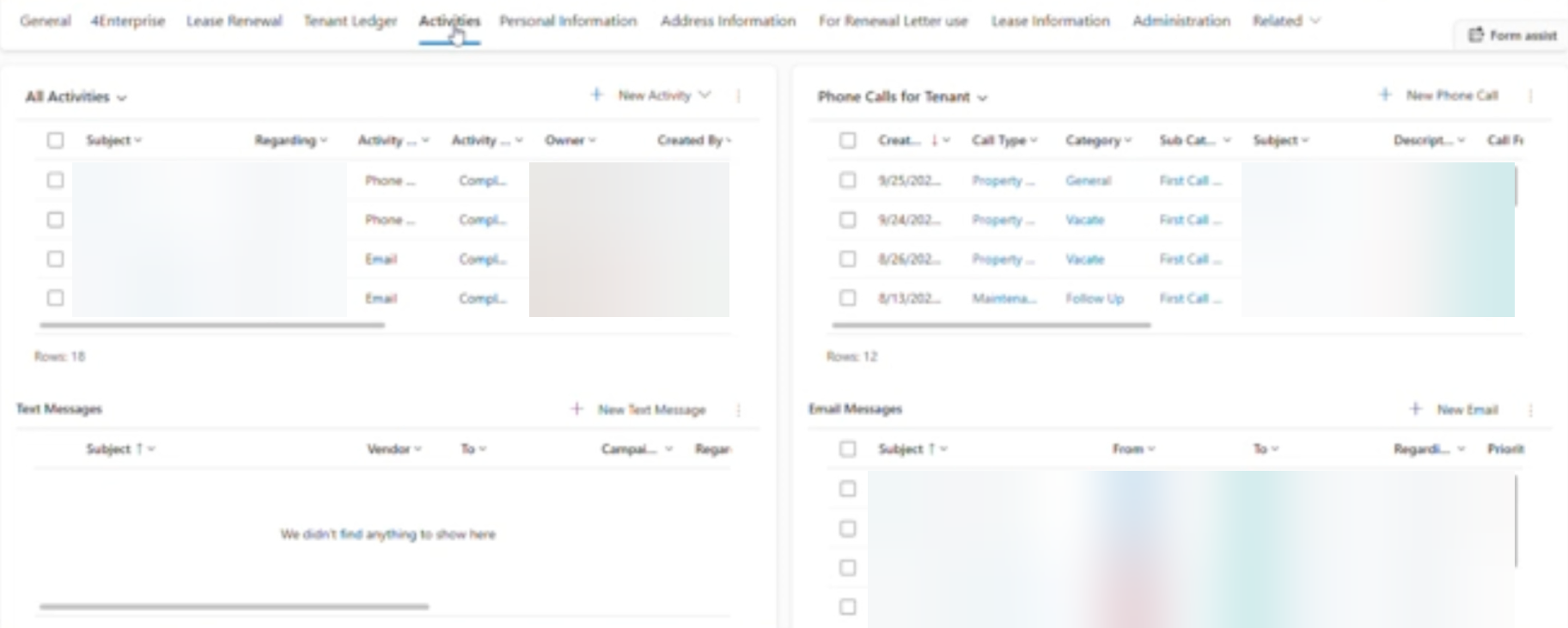
The legacy CRM already brought activity records into the tenant account. Its Activities tab presented an all-activities table alongside separate phone, text and email panels. The proposal reorganises the history around the sequence of events and the next collections action.
Legacy CRM · Activities tab. Cropped directly from the original screenshot, with personal details blurred into the image. The interface has not been regenerated.
Proposed workspace
Read the sequence. Understand the commitment.
In the annotated Activity view above, calls, commitments and balance updates form one chronological history. The current balance, payment arrangement and next action remain alongside it.
Different accounts are shown. The proposed activity is illustrative, and the intended reduction in reconstruction effort was not measured.
Keep the conversation connected to the account.
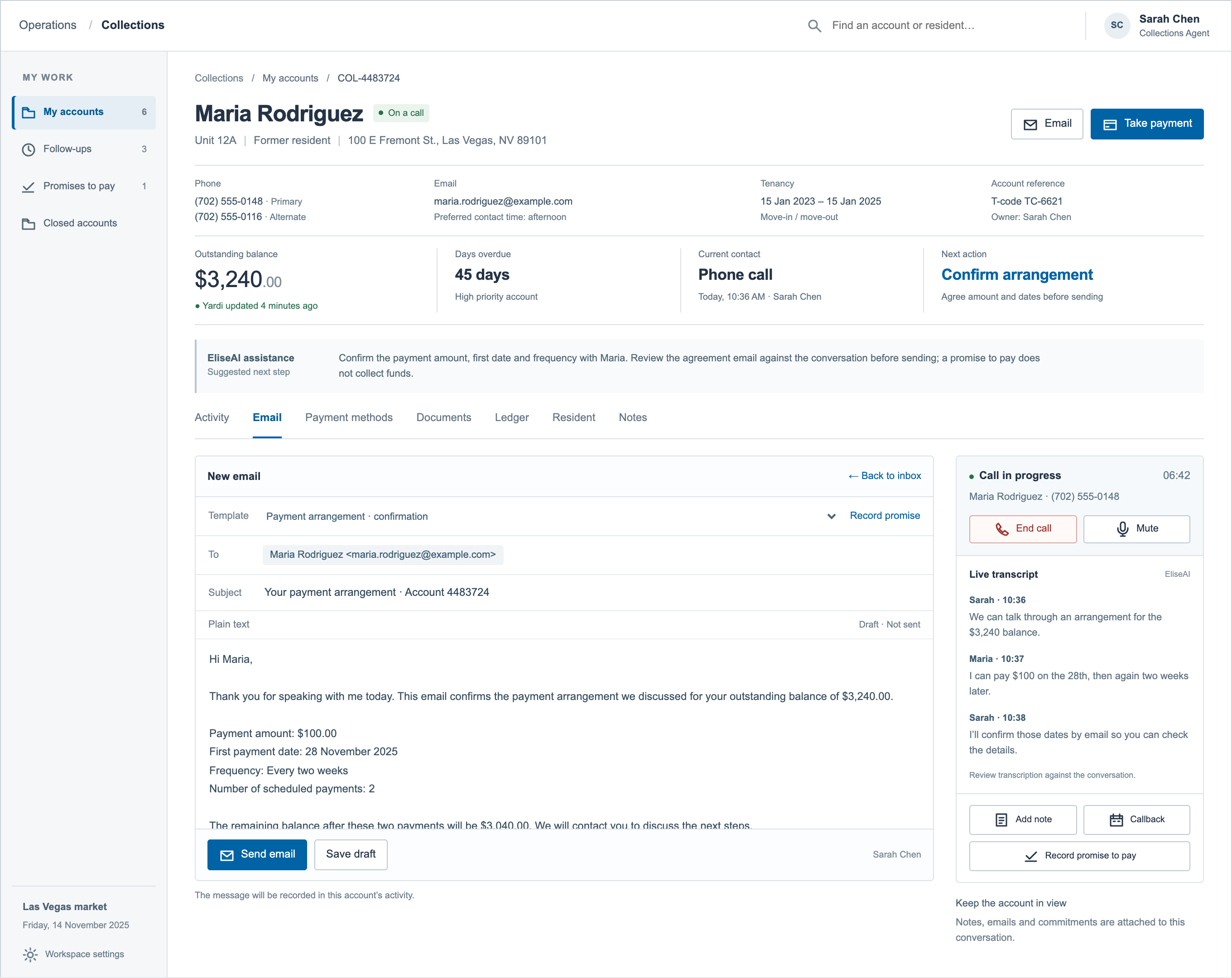
The proposed workspace places email, call context and follow-up actions alongside the account. Agents can review an arrangement and prepare its confirmation without losing the information behind the conversation.
Refined from the original Email and call-panel wireframe. The draft, conversation and agreed next step stay attached to the same account; assistance and transcription remain concepts requiring validation.
Decision 03
Bring the existing promise-to-pay workflow into the account.
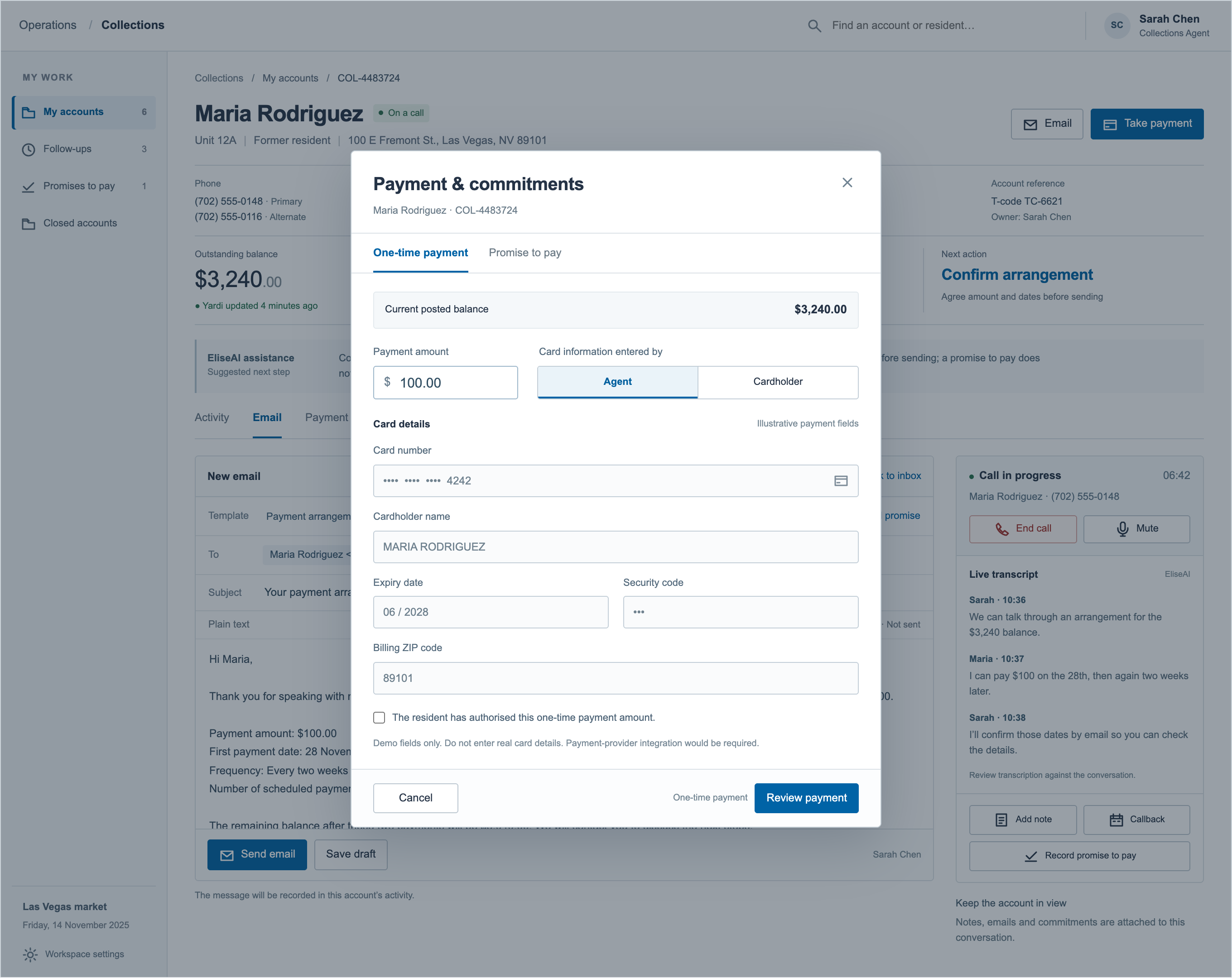
Promise to pay was already part of AMH’s system. My contribution was how this existing workflow was presented within the proposed account workspace, alongside payment actions and account context. The refined wireframe makes the choice between recording a future commitment and taking a payment visible, with authorisation and review before payment submission.
Refined from the original payment wireframe. The account stays in view behind the dialog; the primary action leads to review, not an immediate charge. Payment fields are illustrative, not a working integration.Another point of human review: assignment suggestions
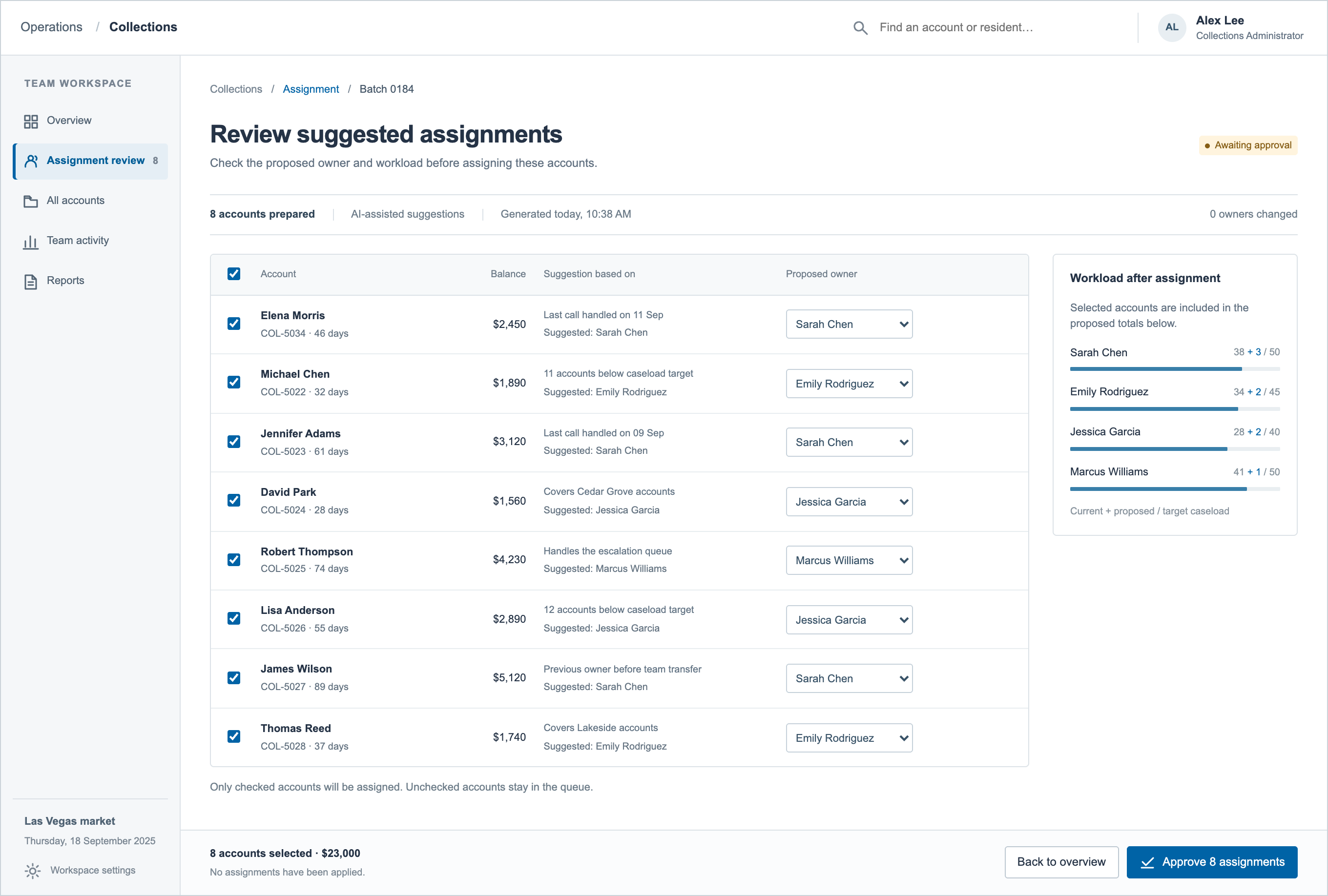
Review the recommendation before assigning the work.
The assignment concept exposes the suggested owner and rationale, while retaining the administrator’s ability to change the assignment before approval.
The assignment suggestions shown here were exploratory concepts. Their AI capabilities and technical feasibility still needed validation.
04 · Outcome and handoff
A coherent account model. A handoff the team could build on.
In one week, I translated the existing consolidation brief into a research-backed account model, workflows for both roles and wireframes. I handed these to AMH’s internal designer with the design rationale to continue the work.
The collections lead supported the overall direction and clarified which payment actions should retain agent involvement. The completed work gave the team a defined direction for both the workspace and its safeguards.
Evidence to design against
The interview synthesis and journey maps connected fragmented account context, manual follow-up and role differences to product priorities.
Workflows for both roles
Administrator allocation and oversight, alongside agent preparation, contact and follow-up, were organised around the same account model.
Continuity for the next designer
Wireframes and rationale carried the decisions forward, including the points where human review and payment safeguards mattered.
What remained for the next phase
Validate the agent workflow: can someone prepare and progress an account with fewer returns to source systems?
Validate administrator oversight: can the team identify unassigned, stalled or unevenly distributed work without spreadsheet workarounds?
Resolve integration behaviour: how should the workspace respond when balances, payment status or documents are delayed or inconsistent?
My involvement ended at handoff, not production. End-to-end usability and integration feasibility still needed validation; reductions in handling time or context switching were not measured.